.png)
Payout Report
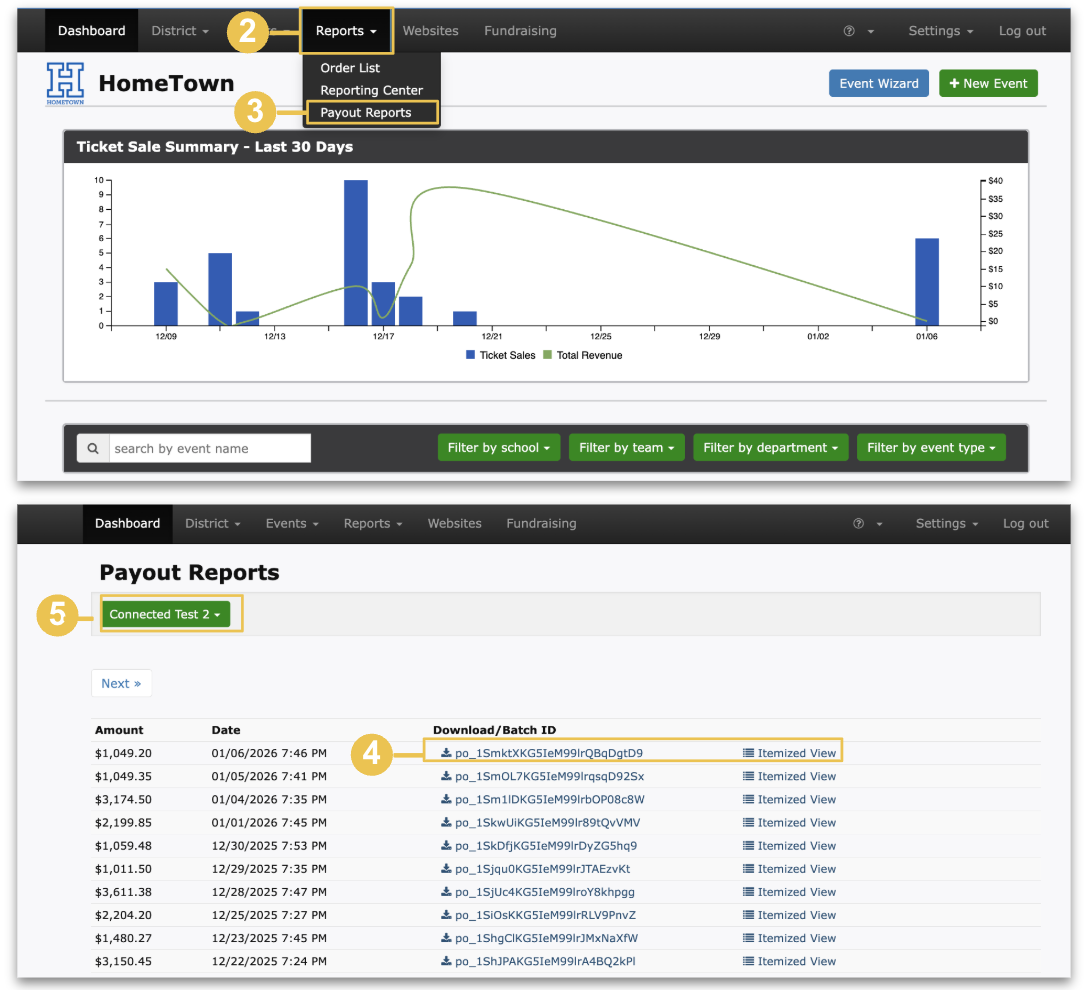
Once direct deposit is set up, you can access detailed payout reports directly from your Box Office. These reports provide visibility into all transactions included in each payout.
Two report options are available:
Itemized View Report – Offers line-by-line transaction details, allowing you to review individual sales and fees.
Batch ID Report – Provides a summary view of transactions grouped by payout batch, rather than individual line items.
Together, these reports help you reconcile payouts efficiently while choosing the level of detail that best fits your needs.
Accessing a Payout Report-
Log into your Box Office
Select Reports in the navigation bar at the top
Select Payout Reports
Select the Download/Batch ID or Itemized View of your choice
If multiple stripe accounts are connected, a drop down menu will be accessible to choose from available accounts