.png)
Trouble with Season Passes not Scanning?
In the Gate App, double check you are scanning passes under the individual event and NOT the season pass event.
ELIGIBILITY DATE: Season Pass Eligibility Start/End must be within the day of the event
TEAM ATTACHMENT: Season Pass Ticket Level & Single Event must be tied to the same TEAM
SINGLE EVENTS: Single Game: Toggle for pass eligible must be ON
ELIGIBILITY DATE: Ensure the Pass start Date and Pass end date are within the day of the event
Login to the box office
Click into your Season Pass event
Scroll down to Ticket Levels & Pricing
Click Edit beside your pass
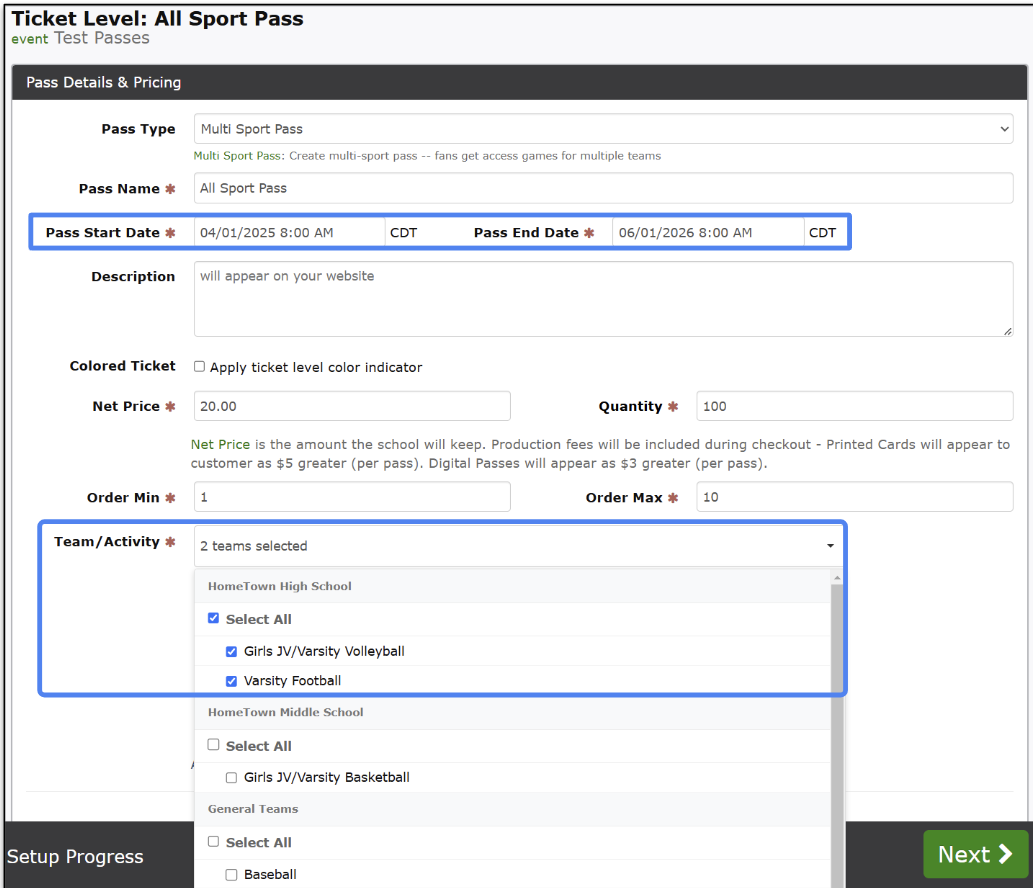
Ensure the Pass Start Date and Pass End Date are correct
TEAM ATTACHMENT: Ensure the Team is attached to the Season Pass
Login to the box office
Click into your Season Pass event
Scroll down to Ticket Levels & Pricing
Click Edit beside your pass
Scroll down to Team/Activity
Ensure the Team/Activity is selected. If it’s not, please select the team and press Submit.
SINGLE EVENTS: Ensure the correct team is tied to the individual event
Login to the box office
Click into your individual event
Under the Event Options click Edit
Scroll down to Team/Activity
Ensure the correct team is selected
SINGLE EVENTS: Ensure the Individual event is Pass Eligible
Login to the box office
Click into your individual event
Scroll down the Advanced Event Options
Ensure Pass Eligible is toggled on
